Tool tracking software
Tool Tracking Software That Shows Who Has Each Tool, and When It’s Due Back.
Trackora gives your team one record of its shared tools: each drill, saw and meter by serial number, who took it and where, when it is due back, and the condition it came back in.
Why shared tools go missing
Tools are small, valuable and always moving. A drill goes out for one job and stays in a van for a month, a meter is lent to another team and nobody writes it down, and a grinder with a loose guard goes back on the shelf for the next person. The sign-out sheet is either out of date or missing.
Tool management software works when recording a check-out takes less effort than skipping it: scan the label, pick the person, done. Trackora keeps each power tool’s record, holder and history in one workspace your whole team shares.
- Know who has every tool
- See what is overdue today
- Stop damaged tools going back out
- Count the store by scanning
How Trackora tracks your tools
Shown with the real application and a fictional facilities team.
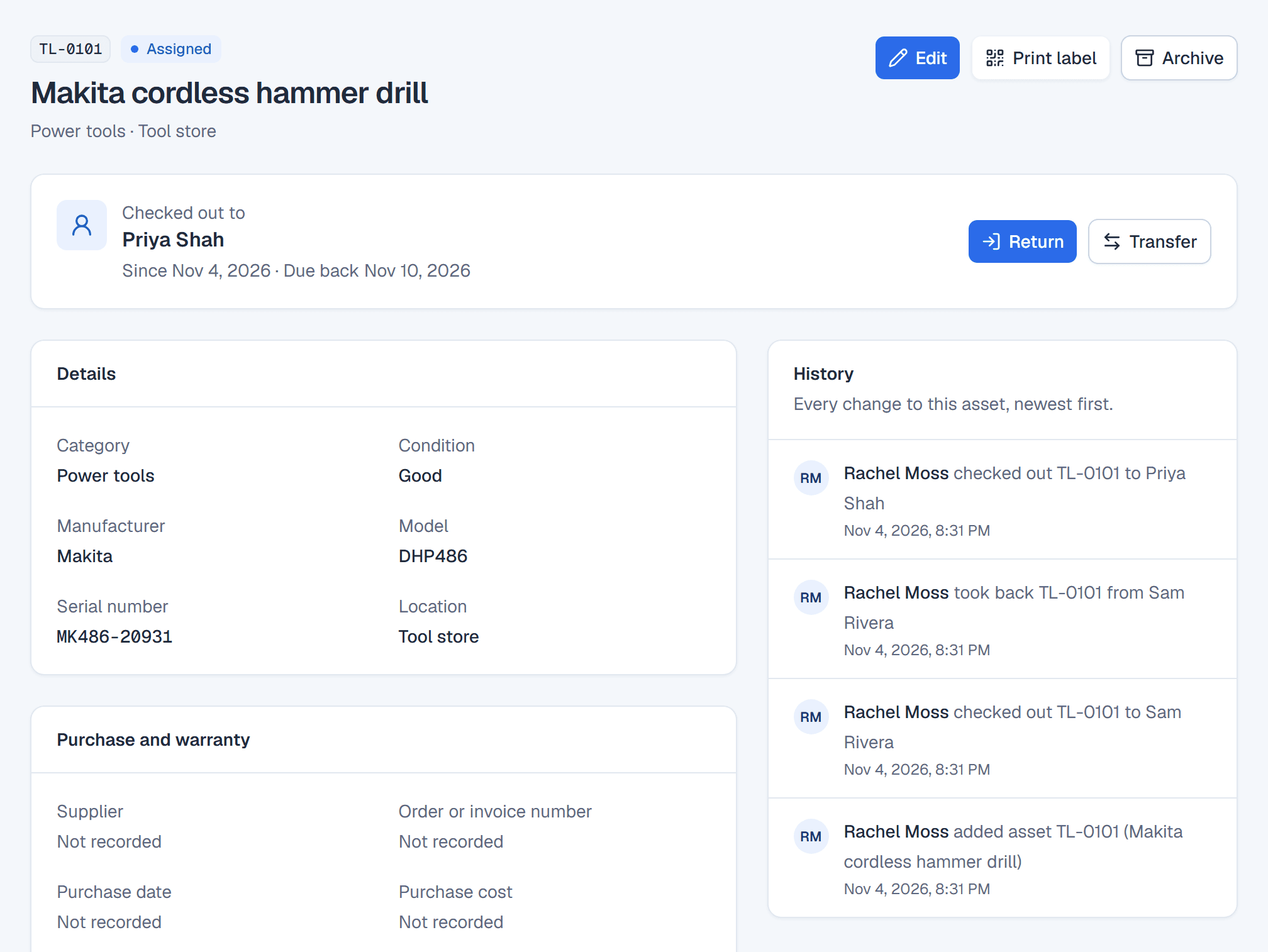
A record for every tool, down to its serial number
Give each tool its own record: tag, name, category, manufacturer, model and serial number, where it is kept, and the condition it is in. Two identical drills are two records, each with its own history, so you always know which one came back damaged.
Find a tool by its tag, name, serial number, model or manufacturer. An owner or administrator can import your existing tool list from a CSV file, and Trackora shows any problems before anything is imported.
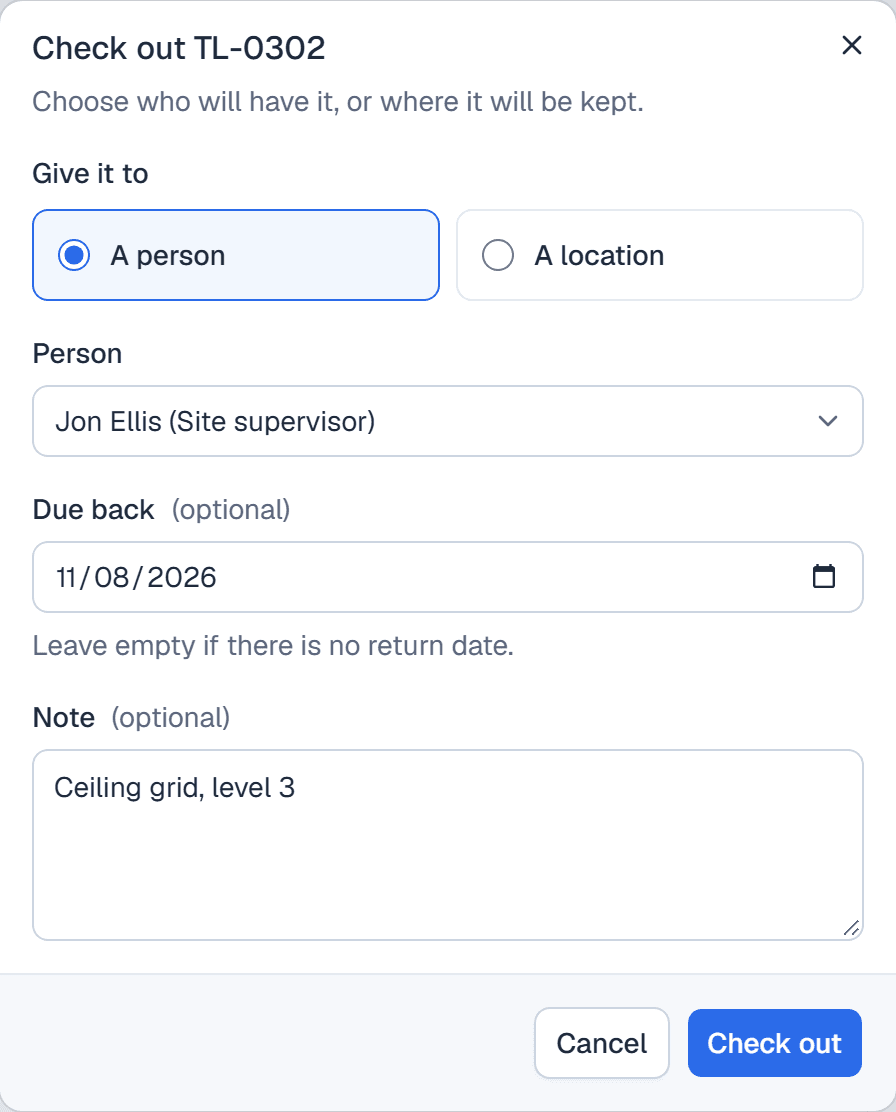
Check tools out to a person, a van or a site
Check a tool out to the person taking it, or to a location you have set up, such as a van or a site store, with a due-back date and a note about the job. Only tools marked Ready can be checked out, so a tool set aside for repair is not handed out by mistake.
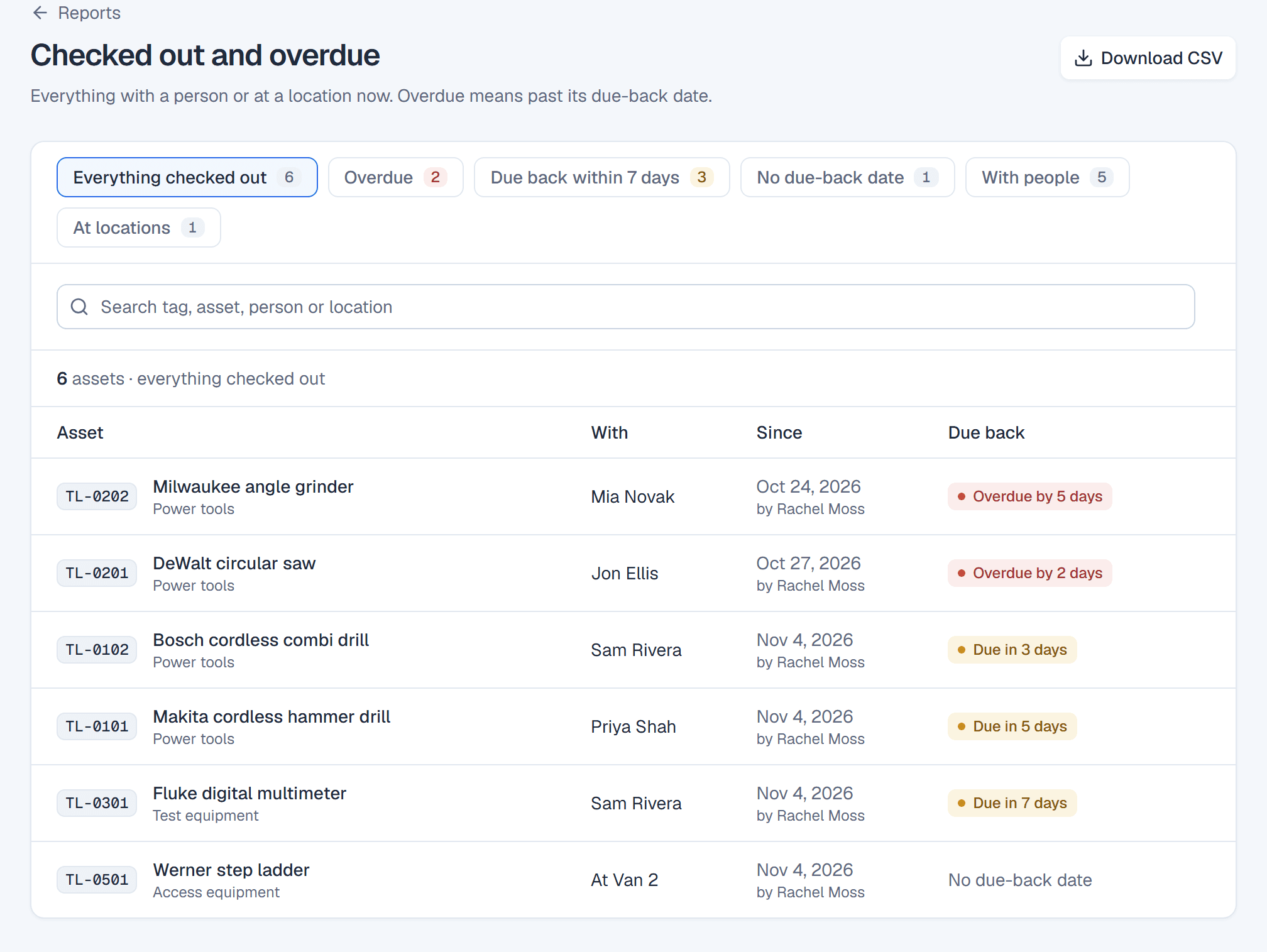
See every tool that is out, and which ones are overdue
The Checked out and overdue report lists every tool with a person or at a location, since when and by whom, and when it is due back. Filter it to what is overdue, due back within 7 days, with people or at locations, and download it as a CSV file.
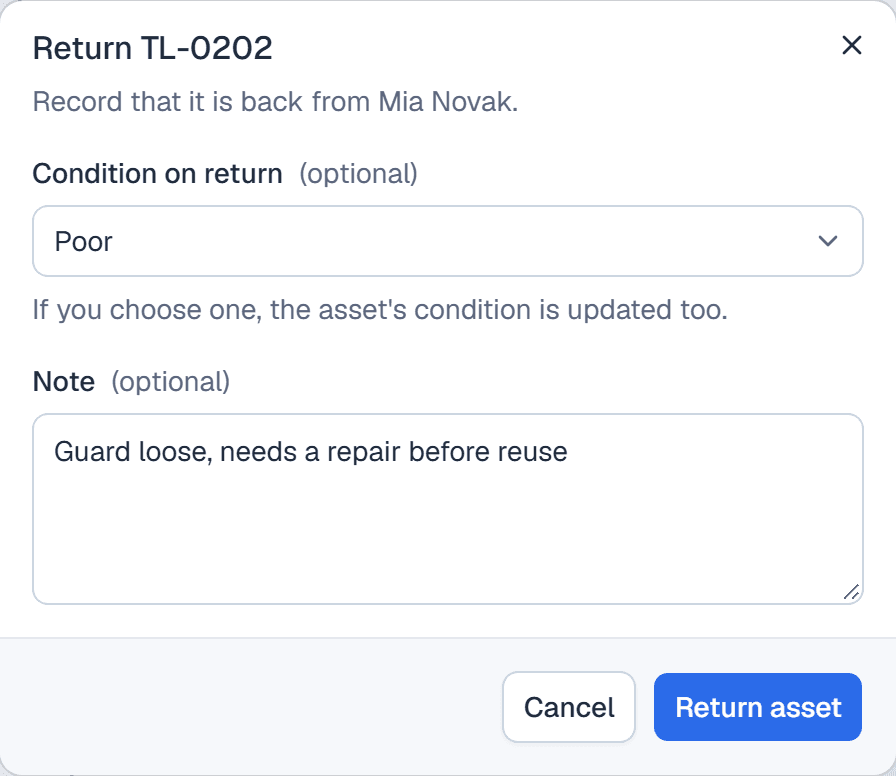
Record the condition every tool comes back in
When a tool comes back, record its condition and a note; the condition is saved on the tool’s record. If it needs repair, set its status to In repair and it cannot be checked out until it is Ready again. A tool going straight from one person to the next can be transferred without a return in between.
QR labels that open the tool’s record
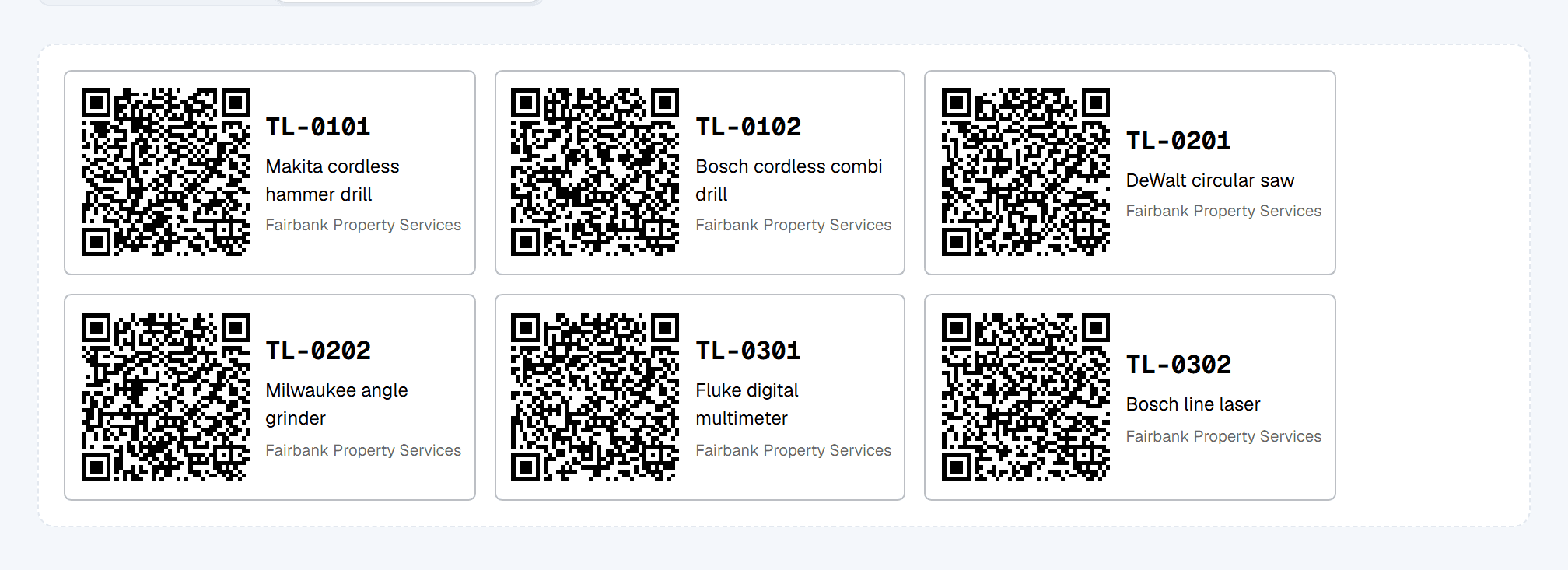
Print QR labels with each tool’s tag and name, in two sizes and up to 200 at a time, from your browser. Scanning a label with a phone camera opens the tool for members of your workspace, where they can check it out or back in on the spot; to anyone else, the label opens nothing.
Count the tool store by scanning
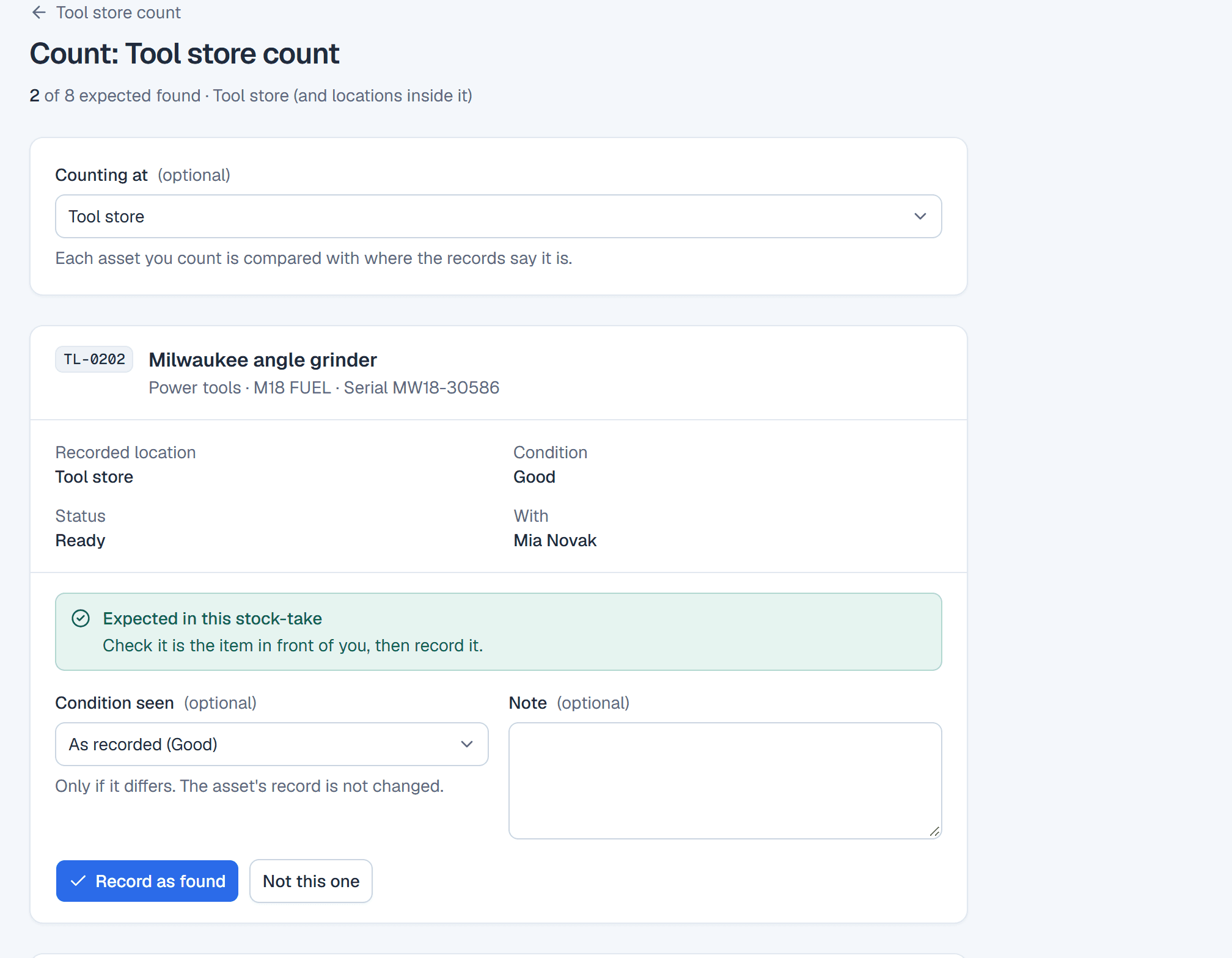
Start a stocktake for a store, a van or a category of tools, and scan or type each tag you find. Trackora shows each tool’s recorded location and who it is with, flags tools found somewhere else or in a different condition, and lists what is missing when you finish. Counting never changes a tool’s record; differences are corrected or accepted afterwards.
A history of who had each tool
Every check-out, return, transfer and change goes into the tool’s history, naming the team member who recorded it and when, so you can see who had a tool before it came back broken. Reports also cover tools by category and location, and every completed stocktake.
Recorded locations, not live tracking
Trackora knows where a tool is because someone on your team recorded it. It does not detect tools, follow them or raise an alert when they move. A tool’s holder and location change only at moments like these:
- Checked out to a person or a location
- Returned, with its condition
- Transferred from one holder to the next
- Moved to another location on its record
- A stocktake difference that someone corrects
Between those moments the record shows the last person or place recorded. A stocktake is how you check it against what is really there.
A tool checkout workflow your team will keep up
- 1
Register
Import your tool list with makes, models and serial numbers, or add tools as you buy them.
- 2
Label
Print a QR label for each tool and fix it where a phone can reach it.
- 3
Check out
Record who takes each tool, or which van or site it goes to, and when it is due back.
- 4
Return
Record each return and its condition, and take damaged tools out of use until they are repaired.
- 5
Count
Scan what is in the store, and follow up what is missing or in the wrong place.
Tool and equipment tracking in one workspace
Tools sit alongside the rest of your equipment, each in its own category. More on each part:
- Equipment check-in and check-out
Loans, due-back dates and overdue returns for any shared equipment.
- QR code asset tracking
Printing labels, scanning them, and counting by scanning.
- Equipment tracking software
Devices, tools and kit in daily use, with status and condition.
- Asset tracking software
One register of everything your organization owns.
What Trackora does not do
Trackora records who has your tools and what state they are in. It is not a tracking device or a specialist tool-crib system:
- No live location: Trackora does not fit trackers to tools or locate them by satellite, radio or Bluetooth. It shows the person or place your team last recorded.
- No automatic location updates, geofencing or theft alerts: a tool’s record changes only when someone on your team records a check-out, return, transfer, edit or stocktake correction.
- No reservations: tools cannot be booked in advance.
- No servicing, calibration or inspection scheduling, and no reminders for them.
- Not stock control for consumables such as blades, bits or fixings: every tool is an individual item with its own record.
- No automatic connections to other systems: records come in and go out as CSV files.
Pricing
One subscription per workspace, from $39 a month, for your whole team, with every feature on every plan. See pricing for the plans, or go back to the Trackora home page.
Questions
- What is tool tracking software?
- Software that records which tools an organization has, who has each one or where it is kept, when it is due back, and what condition it is in. It replaces the sign-out sheet on the store door, so the answer is still right when the sheet would have been lost.
- Can Trackora show where a tool is right now?
- No. Trackora shows the person or location your team last recorded for each tool, updated by every check-out, return and transfer. It does not use trackers, so a tool that is moved without being recorded still shows its last recorded holder until someone records the change. A stocktake shows where it really is.
- Can people check tools out themselves?
- Anyone on your team you invite to the workspace can check a tool out or back in, including from a phone by scanning its label. People who only borrow tools are records in Trackora rather than accounts, so a member records their check-outs.
- Can we track calibration or service dates?
- Not as a schedule. You can mark a tool In repair, which stops it being checked out until it is Ready again, and record notes when it is returned, but Trackora does not plan or remind you of service or calibration dates.
- Is there a free trial?
- Yes. Every new workspace starts with a free trial, and no payment details are needed to start.
Something else? Contact us.
Know who has every tool
Create a workspace, import your tool list and check the first tool out today. No payment details needed to start.